# moonmix
A pavucontrol-style volume control for modern Linux audio (PipeWire with
WirePlumber), written in [MoonBit](https://www.moonbitlang.com) with a GTK4
GUI.
moonmix talks to the audio stack **through its libraries**: libwireplumber-0.5
on top of libpipewire-0.3. It never runs `wpctl`, `pactl`, `pw-cli`,
`pw-dump` or any other CLI tool.
| Playback | Output Devices |
| --- | --- |
| 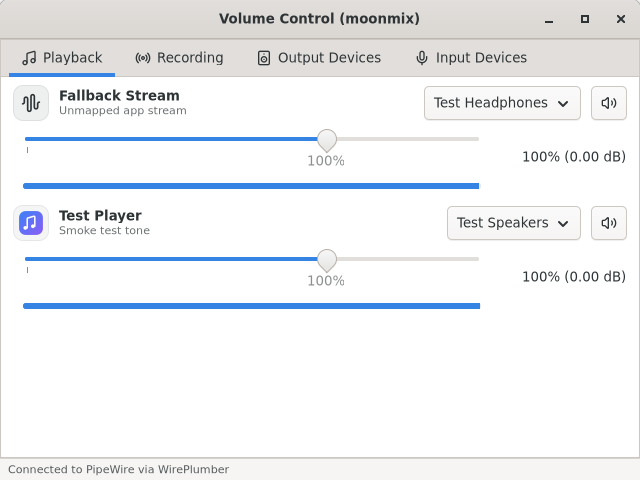 | 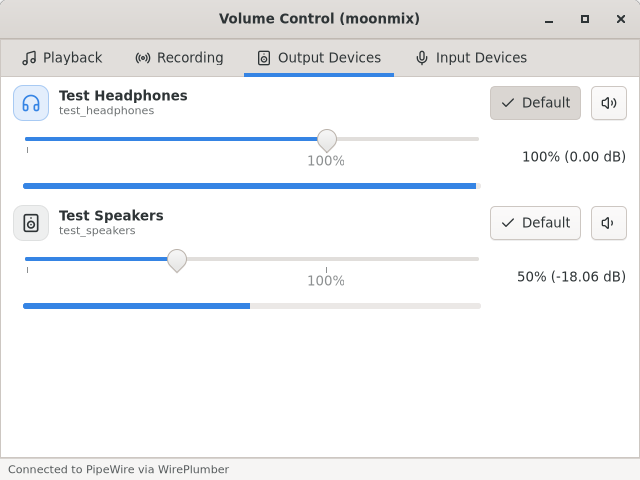 |
| **Recording** | **Input Devices** |
| 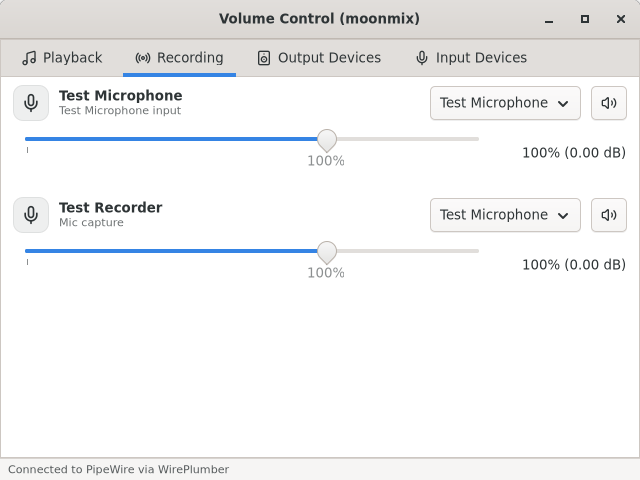 | 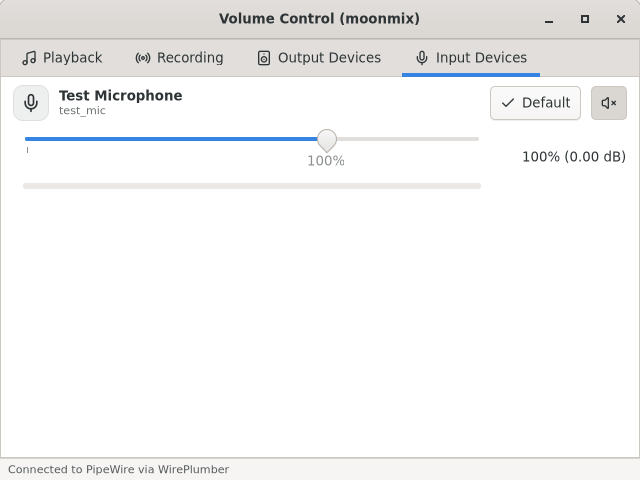 |
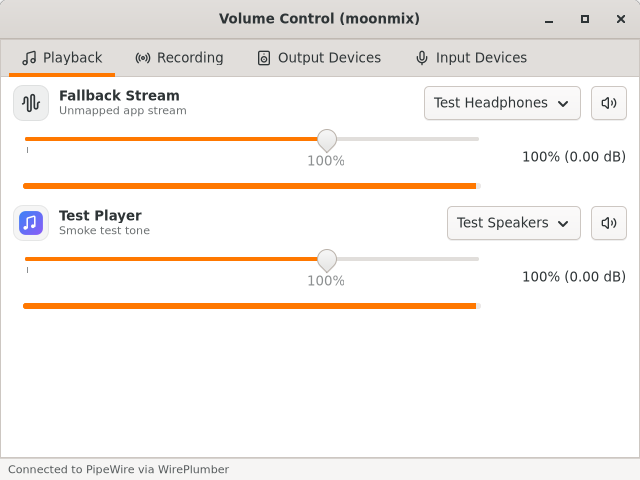
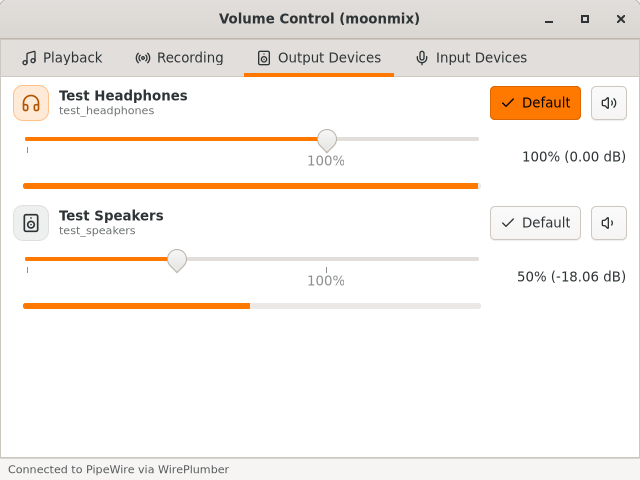
*(Rendered headlessly against a private PipeWire with null sinks; see
[Testing](#testing).)* With an orange system accent colour:
| Playback | Output Devices |
| --- | --- |
|  |  |
## Features (v1)
- **Playback**: every application stream, with a volume slider, mute and the
output device it plays to (choose another to move it).
- **Recording**: capture streams, same controls, input device selector.
- **Output Devices** / **Input Devices**: sinks and sources with volume, mute
and a *Default* toggle that shows and sets the default device.
- **Live peak meters** under each slider on Playback, Output Devices and
Input Devices, on the same cubic scale as the slider. Only the visible
tab is metered; meters on outputs and app streams are passive, so they
never keep an idle device running.
- Volumes in percent exactly like pavucontrol/wpctl: the cubic mapping of
PipeWire's linear `channelVolumes`, up to 150%, with the dB value next to
it. One slider moves all channels, keeping the channel balance.
- **Follows the desktop's accent colour and dark/light style**, live (see
[Appearance](#appearance)).
- Live updates: devices and streams appearing, disappearing or changing
elsewhere (another mixer, keyboard volume keys, a new Bluetooth headset)
show up immediately.
Not yet included: the Configuration tab (card profiles), per-channel
sliders, monitor sources in Input Devices, meters for recording streams.
## Architecture
```
cmd/moonmix GUI: builds tabs, reconciles widgets with view rows
cmd/moonmix-probe headless CLI over the same stack (smoke tests, debugging)
model/ pure MoonBit: volume curve, state reducer, view model
wp/ WirePlumber binding: wp_stub.c + wp.mbt
gtk/ minimal hand-written GTK4 binding: gtk_stub.c + gtk.mbt
tools/pkg-cc C compiler wrapper that adds pkg-config flags
```
```mermaid
flowchart LR
PW[(PipeWire)] <--> WP[libwireplumber
mixer-api, default-nodes-api,
object manager]
WP -- "(kind, id) events" --> WPB[wp package]
WPB -- "model.Event" --> S[model.State.apply]
S --> V[model.rows / diff_rows]
V --> G[GTK4 widgets]
G -- "set volume / mute / default / move" --> WPB
```
- **WirePlumber, not raw PipeWire.** The C layer (`wp/wp_stub.c`, about 460
lines) does what `wpctl` does internally. A `WpObjectManager` watches audio
nodes, links and the `default` metadata. The **mixer-api** plugin reads and
writes volume and mute; for hardware sinks it goes through the device's
route, which is where pavucontrol's numbers live. The **default-nodes-api**
plugin reads and sets the default sink and source. To move a stream,
moonmix sets `target.object` in the `default` metadata, as pipewire-pulse
does for pavucontrol. Peak meters are small capture `pw_stream`s on
WirePlumber's own `pw_core`, created with the properties pipewire-pulse
gives pavucontrol's peak streams (`stream.monitor`, `target.object`,
`stream.capture.sink` for sinks); their `process` callback only folds
samples into a peak value that a 40 ms GUI timer reads and resets. Nodes
with `stream.monitor` (ours and pavucontrol's) are hidden from the tabs.
The C layer sends MoonBit one callback per change,
`(kind, id)`. MoonBit then pulls node properties and volumes through small
accessor functions, so no C structs cross the FFI boundary.
- **One main loop.** WirePlumber and GTK4 both run on the default GLib main
context, so events arrive on the GUI thread with no locking or polling.
- **Pure core.** Everything else is plain MoonBit in `model/`: the cubic and
linear conversions, dB formatting, linked-slider scaling, the reducer that
applies node, link and default events, the per-tab rows, and the row diff
the GUI applies. `moon test` covers it on any target.
- **GTK binding.** It is hand-written and minimal. Each widget gets a tag
when it is created, and signals come back as `(tag, value)` through a
single callback. While MoonBit updates widgets from the model, signals are
suppressed so model updates never echo back into PipeWire. For a short
time after the user moves a slider, remote updates to that slider are
ignored so it doesn't jump while being dragged.
## Appearance
moonmix reads the desktop's **accent colour** and **colour scheme** from the
XDG Desktop Portal (`org.freedesktop.portal.Settings`, namespace
`org.freedesktop.appearance`: `accent-color` and `color-scheme`), which GNOME
47+, KDE Plasma 6 and others implement, over GDBus in `gtk/gtk_stub.c`, and
follows `SettingChanged`, so changing them in the system settings applies at
once. The selected tab, the volume sliders, the peak meters and the checked
*Default* button take the accent colour; a dark/light preference switches the
theme's variant (`gtk-application-prefer-dark-theme`, and
`gtk-interface-color-scheme` on GTK 4.20+).
The colours come from `model/accent.mbt` (unit-tested): text and icons on
accent backgrounds are white while that reaches a 3:1 WCAG contrast, else
whichever of white and black contrasts more (black on orange or yellow); the
accent used as a text colour is darkened or lightened until it reaches 4.5:1
on the window background. They are applied by a `GtkCssProvider` at
application priority that sets the accent named colours (`accent_bg_color`,
`accent_fg_color`, `accent_color`, `theme_selected_bg_color`, and the
`--accent-*` variables) for themes that use them, plus explicit rules, since
GTK's built-in Default theme hardcodes its blue.
Without a portal, or when no accent is set, the theme's own accent stays.
moonmix uses the portal directly rather than libadwaita (whose
`AdwStyleManager` does the same on 1.6+) to keep GTK's standard look and
avoid a dependency and a move to `AdwApplication`.
## Building
### Dependencies
You need MoonBit (`curl -fsSL https://cli.moonbitlang.com/install/unix.sh | bash`,
then add `~/.moon/bin` to `PATH`), a C compiler, `pkg-config` and the
development files:
| Distro | Packages |
| --- | --- |
| Arch | `pipewire wireplumber gtk4 pkgconf base-devel` |
| Debian 13+ / Ubuntu 24.04+ | `build-essential pkg-config libpipewire-0.3-dev libwireplumber-0.5-dev libgtk-4-dev` |
| Fedora (untested) | `gcc pkgconf-pkg-config pipewire-devel wireplumber-devel gtk4-devel` |
You need WirePlumber **0.5** and GTK **4.12** or newer. Debian 11 and 12
ship WirePlumber 0.4, which is not supported.
### Build and run
```sh
moon build --target native --release
./_build/native/release/build/cmd/moonmix/moonmix.exe
```
To install it for your user:
```sh
install -Dm755 _build/native/release/build/cmd/moonmix/moonmix.exe ~/.local/bin/moonmix
install -Dm644 data/org.latha.moonmix.desktop ~/.local/share/applications/org.latha.moonmix.desktop
install -Dm644 data/icons/hicolor/scalable/apps/org.latha.moonmix.svg ~/.local/share/icons/hicolor/scalable/apps/org.latha.moonmix.svg
install -Dm644 data/icons/hicolor/symbolic/apps/org.latha.moonmix-symbolic.svg ~/.local/share/icons/hicolor/symbolic/apps/org.latha.moonmix-symbolic.svg
install -Dm644 -t ~/.local/share/icons/hicolor/scalable/actions data/icons/hicolor/scalable/actions/moonmix-*.svg
gtk-update-icon-cache -f -t ~/.local/share/icons/hicolor # optional
```
The app icon is `org.latha.moonmix` (three gold-lit mixer faders on a dark
violet-slate card), shipped as scalable and symbolic SVGs under
`data/icons/hicolor/`. The window uses it as its icon and the program name is
`org.latha.moonmix`, which matches the `.desktop` file so Wayland shells show
it too. Run from a checkout, moonmix also searches `./data/icons` and
`$MOONMIX_ICON_DIR`.
### OCI container and desktop launcher (Wayland)
With **rootless Podman**, Python 3, a Wayland desktop and a running host
PipeWire session, no host MoonBit toolchain or audio/GTK development
packages are needed:
```sh
podman build --format=oci -t localhost/moonmix:latest .
python3 tools/install-container.py
~/.local/bin/moonmix-container
```
The multi-stage `Containerfile` builds a release executable, then installs
only runtime dependencies, icons and fonts in the final Ubuntu 26.04 LTS
image. Its GTK 4.22 avoids GTK 4.18's startup crash on compositors advertising
linux-dmabuf v6, including recent KDE Plasma. Set
`--build-arg MOONBIT_VERSION=` to select a particular MoonBit
toolchain. The image stays local; it is not published to a registry.
The installer adds **moonmix** to the application menu, using an absolute
path to `~/.local/bin/moonmix-container`, and installs the app icons. It
replaces the per-user native `.desktop` entry, if present, but leaves the
native `~/.local/bin/moonmix` executable untouched. The installed runner
does not depend on this checkout. Rebuild the image after source changes;
set `MOONMIX_IMAGE` to run a different local tag.
The runner maps your user ID and mounts only the Wayland and PipeWire
sockets (including `PIPEWIRE_RUNTIME_DIR` / `PIPEWIRE_REMOTE` overrides),
`$XDG_RUNTIME_DIR/bus` when present for desktop appearance settings, and
whichever standard host icon, pixmap and `.desktop` directories exist
(`/usr/share/{icons,pixmaps,applications}`, Flatpak exports and
`$XDG_DATA_HOME/{icons,applications}`) read-only under `/run/moonmix/host/`.
Setting `XDG_DATA_DIRS` inside the container lets GIO and `GtkIconTheme`
resolve full-colour host application icons (such as Firefox, Spotify or
Flatpaks) while bundled Lucide symbolic icons in `/usr/share/icons/hicolor`
remain used for devices and controls. It has no network, GPU devices,
home-directory mount or elevated privileges; the root filesystem is
read-only and temporary files disappear on exit. Software rendering avoids
depending on the host's GPU drivers. The image sets
`MOONMIX_ICON_THEME=Adwaita` so a host-only icon theme does not leave
symbolic fallback icons missing; native runs keep the desktop's icon theme.
This is packaging, **not a sandbox for untrusted apps**: the sockets still
grant access to your audio session, display and, when mounted, session
D-Bus. X11 sessions are not supported by this runner.
The image also includes `moonmix-probe` for diagnostics; run it with
`podman exec moonmix-probe` to inspect the host audio
graph without changing it.
### Icons
UI controls, tabs, devices and fallback streams use bundled crisp 24×24
[Lucide](https://lucide.dev) symbolic SVGs (`data/icons/hicolor/scalable/actions/moonmix-*.svg`,
under the ISC License — see [LICENSE.lucide](data/icons/LICENSE.lucide)),
which GTK4 recolours automatically to match light, dark and accent-tinted
surfaces, with standard freedesktop icon names as secondary fallbacks.
Row icons sit inside a 36×36 px soft rounded tile (20 px for symbolic icons,
26 px for full-colour app icons, and accent-tinted for the default device);
button and tab icons are 16 px.
The chains are chosen in `model/icons.mbt` and tested with `moon test`;
the GTK layer checks `has_icon` (or `"file:"` for absolute icon paths):
- **Devices**: bundled `moonmix-device-*-symbolic` icons matched from
`device.form-factor` (speaker, headphones, headset, microphone, webcam,
phone, tv/hdmi display), HDMI/DisplayPort/webcam/Bluetooth/USB hints and
sink/source direction, falling back to freedesktop names (`audio-card-symbolic`,
`audio-x-generic-symbolic`).
- **Streams**: full-colour application icons first (`application.icon-name` /
`media.icon-name`, `.desktop` lookup via `GDesktopAppInfo` including `GFileIcon`
file paths, and direct theme names from `app_id` / binary), then any
symbolic hints, then `moonmix-device-mic-symbolic` for recording streams and
`moonmix-app-fallback-symbolic`.
- **Mute button & tabs**: `moonmix-volume-high/medium/low/muted-symbolic` and
`moonmix-tab-{playback,recording,output,input}-symbolic` (with freedesktop
fallbacks).
Pkg-config flags: moon does not expand `$(pkg-config ...)` in `moon.pkg`
link options. Instead, the packages point `link.native.stub-cc` and `cc` at
`tools/pkg-cc`, a wrapper that adds
`pkg-config --cflags --libs libpipewire-0.3 wireplumber-0.5 gtk4 gio-unix-2.0`. moon
derives the archiver name from the compiler name, so `tools/pkg-ar` is a
passthrough to `ar`. Set `MOONMIX_CC` or `MOONMIX_AR` to use another
compiler or archiver.
### Headless probe
`moonmix-probe` uses the same binding and model without a GUI:
```sh
P=./_build/native/debug/build/cmd/moonmix-probe/moonmix-probe.exe
$P # print what every tab shows
$P volume alsa_output.pci-0000_00_1f.3.analog-stereo 40
$P mute 57 1 # node id or node.name
$P default bluez_output.XX_XX.1
$P move
$P meter # peak over ~1.5 s; exit 6 if silent
```
## Testing
```sh
moon test --target wasm-gc # pure model tests, no libraries needed
moon check --target native # type-check everything
python3 tools/test-container.py # runner/desktop tests, no image build needed
tools/smoke-test.sh /tmp/shot # needs pipewire, wireplumber, pw-cat, gtk4-broadwayd
# (+ python3-gi, dbus-daemon for the accent shots)
```
`tools/smoke-test.sh` starts a private PipeWire and WirePlumber in a temp
`XDG_RUNTIME_DIR`. The instance has two null sinks, a loopback virtual
microphone, one playback stream of noise and one capture stream created with `pw-cat`; the CLI is used only
by the test harness. The script runs every probe action and checks its effect, checks that peak
meters on the stream and its sink see the signal,
then starts the GUI under GTK's broadway backend. With `MOONMIX_SCREENSHOT`
set, the GUI renders each tab offscreen to a PNG and exits. If `python3`
with PyGObject and `dbus-daemon` are available, it then starts a private
session bus with a fake portal (`tools/fake-portal.py`) that reports a green
accent, switches it to orange while moonmix runs, and renders the tabs again
(`-accent-.png`) once the change has been applied.
CI (`.gitea/workflows/ci.yaml`) runs the pure checks on the default runner.
It runs the native build and the smoke test in a `debian:trixie` container,
because bullseye has no WirePlumber 0.5.
## Releases
Versioning uses [sweet](.sweet.yml): add a change note with `sweet change`
and prepare releases with `sweet bump`. The version lives in `moon.mod` (the
`// sweet-version` line).